
How to Keep Your Side Gig From Requiring Full-Time Gig Energy
For many wedding pros and creatives, a business begins as a side gig, something you build around your full-time job until it grows enough to become your main career.
That’s how it started for me. My HoneyBook journey started in 2021 when I launched Dog Of Honor®, my wedding pet chaperone business, while holding down a full-time corporate gig.
At the time, I could only take weddings on weekends and consultation calls in the evenings or on weekends. I was excited about building my business, but my calendar wasn’t sitting there with wide-open spaces waiting to be filled.
I needed a process that didn’t depend on me remembering to send every email. Between software sales, work travel, and weekend weddings, my ADHD brain could NEVER keep up with that.
I wanted to reserve my time and attention for serving my clients and caring for their dogs at the wedding.
Here’s how I used HoneyBook early on to keep the administrative work moving, starting with my biggest time saver.
1. Scheduling without the email tennis
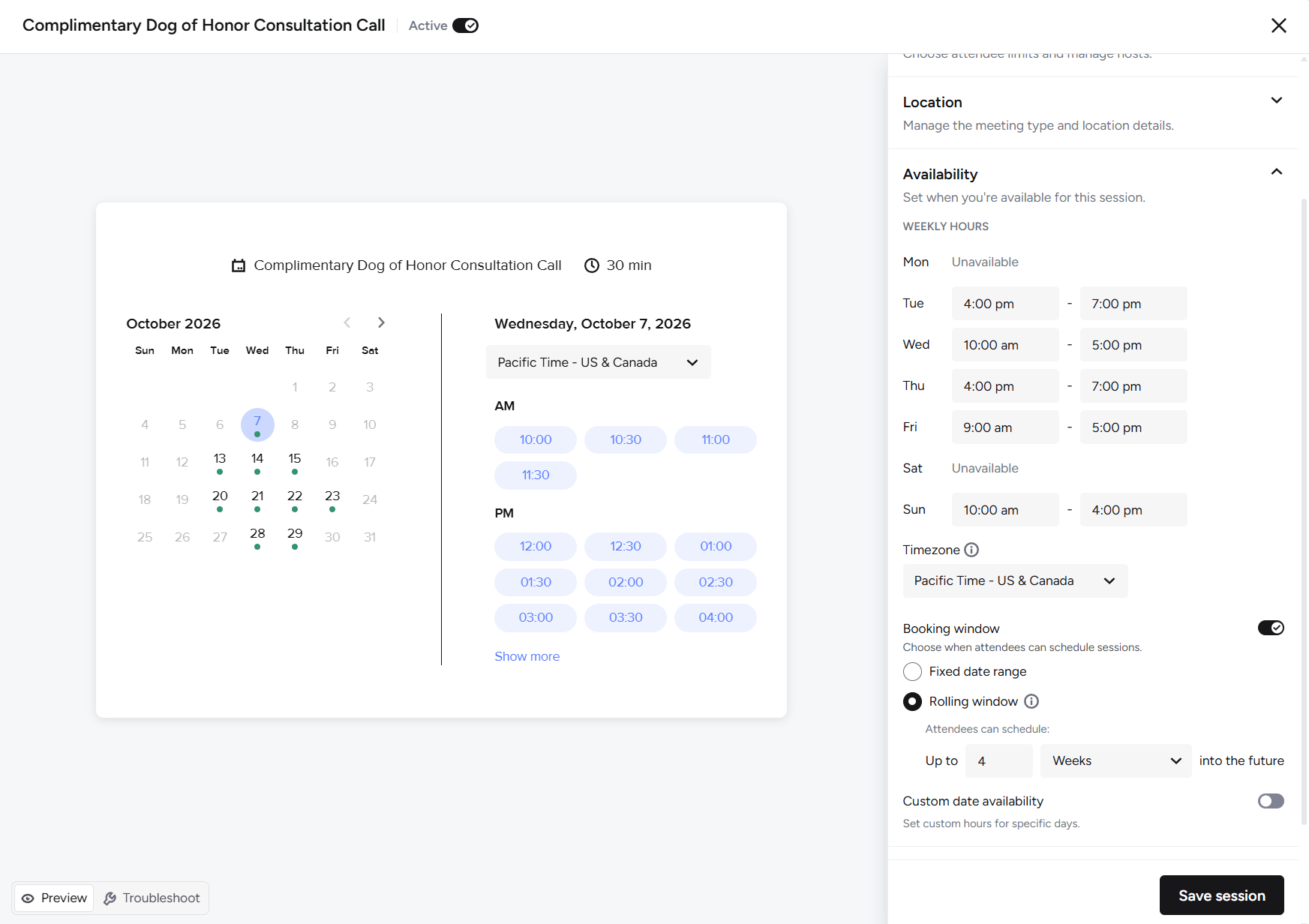
My evenings and weekends were available for consultations.
They were not available for a 12-email conversation about when to have the consultation.
HoneyBook’s scheduler let me easily set the hours I could take calls. It also checked my connected personal calendar for conflicts, helping prevent double bookings. Leads could choose a time from my actual availability, without all the back and forth.
Just as importantly, they knew what to do next when they inquired. They had a way to get a consultation on the calendar, and I was less likely to drop the ball while working and traveling.
This was my number one time saver. And later in the client journey, that same scheduler comes in handy again.
2. Following up without the “wait, did I do that?” moment
Did I follow up? Did I only think about following up? HoneyBook took that guessing game off my plate.
After I sent a proposal, automated follow-up emails built from templates kept the next step clear. I didn’t have to remember to check every proposal and write another email from scratch. If someone had a question, I could respond personally. But the routine follow-up already had a process.
That’s a very helpful distinction when your brain has approximately 27 tabs open.
3. Sending the prep guide without another task on my list
Once a client signed their contract, resources were sent automatically, including the Dog Of Honor prep guide. Write it once. Send it automatically. Save myself from typing the same instructions over and over again. Clients received information to help them prepare without waiting for me to find a moment to send it, and Dog of Honor provided a consistent client experience, no matter how busy I was.
4. Letting payment reminders do their job
Final payment reminders were another thing I could take off my mental list. I already had enough dates to remember. I didn’t need every client’s payment deadline joining the party.
With reminders in place, I didn’t have to compose and send each one manually. Clients received a prompt, and I could give my attention to anything that actually needed it. And in the last 5 years, I’ve only experienced three late final payments because it’s already on autopilot.
5. Getting the check-in call on the calendar
Sixty days before the wedding, clients received an invitation to schedule their check-in call. And yes, HoneyBook scheduler made another appearance.
Once again, clients could choose a time without us starting a fresh round of “What about Tuesday?” “Actually, how about Thursday?”
I still held the call and talked through the details personally. Again, I value giving my personal time and personal touch when it makes sense.
6. Remembering the details before the wedding
Dog attire. Medications. Shot lists. All the practical things we needed to address before the big day.
Automated reminder emails brought those details back to clients at the appropriate point in the process. I could review their responses, ask questions, and discuss anything that needed more attention. But I didn’t have to personally initiate every reminder. When you’re preparing for multiple weddings, those small tasks add up quickly.
7. Following up after the celebration
I also set up an automatic post-wedding follow-up email because after the wedding, there’s still a client experience to finish.
Having that step planned meant it didn’t become another email I needed to remember during a busy week.
Here’s what that looks like as a client journey
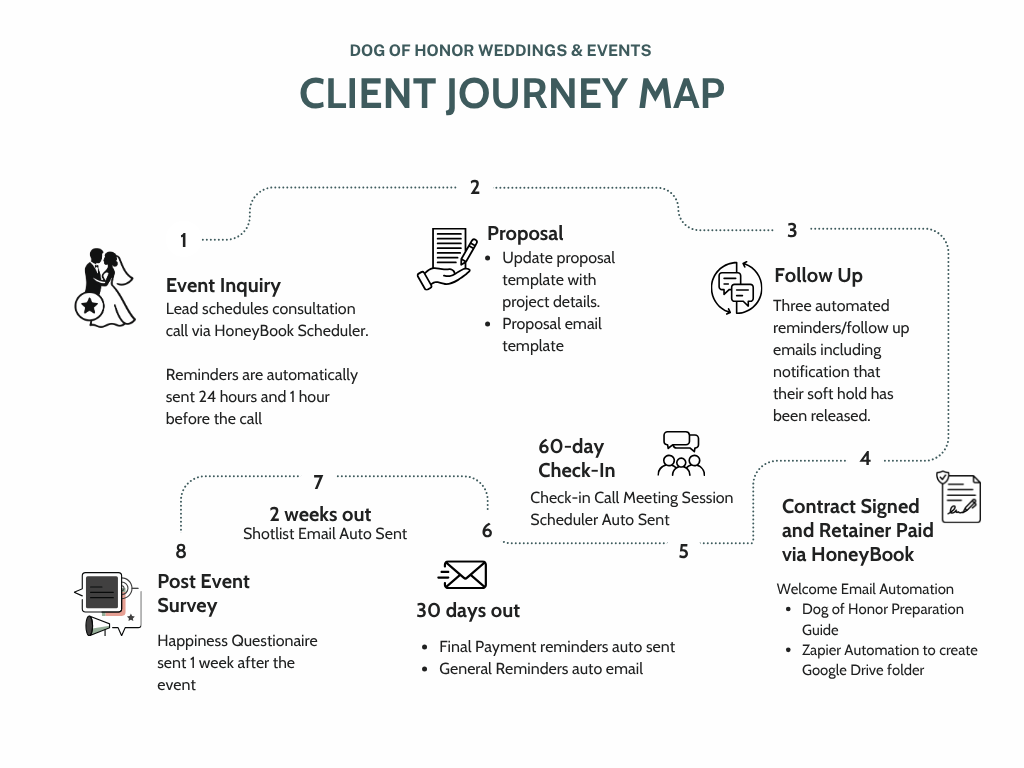
The map shows how these steps fit together, from the first inquiry through the post-wedding follow-up.
If this looks like a lot to remember, that’s because it is. Thankfully, most of it doesn’t require me to remember it.
Most of this client journey requires very little manual effort on my part. The next steps, resources, and reminders are already built into the process.
I’m still there for consultations, questions, planning conversations, and decisions. I just don’t have to personally press “send” every time something needs to happen.
That matters to me because I wanted to spend my weekends helping dogs walk down the aisle, without spending every evening chasing emails.
My clients deserve preparation and communication before the wedding. They also deserve my time and attention when the wedding arrives. These systems help me make room for both.
What I’m exploring next
Of course, once you start taking repetitive tasks off your plate, you start noticing other things you’d love to stop doing manually.
That’s where Zapier comes in.
If you haven’t used it before, Zapier connects different apps so that an action in one can trigger a task in another.
For example, I use it to automatically create a Google Drive folder where I’ll eventually save the photos and videos I capture at a wedding.
Is creating a folder a huge task? No. But it’s one more little thing I no longer have to do.
I’m excited to find more ways to use Zapier for both back-office tasks and the client experience. I already have a few things working, and I’m looking forward to exploring what else is possible.
What’s one task you wish your business tools could handle automatically?
Tell me in the comments, including which apps you use. You don’t need to know how to connect them, just what you’d love to take off your plate.
HoneyBook also now connects with Claude and ChatGPT. Keep an eye out for a future blog post about how AI could fit into your HoneyBook workflow.
Comment AI if you’d like to learn more about AI and HoneyBook.
Start with the thing you keep putting off
You don’t have to build an entire automated client journey this week. Start with one task you repeat constantly. Or the one you keep forgetting. Or the one that makes you think, “Surely I should not still be doing this manually.”
For me, scheduling was the biggest win. For you, it might be proposal follow-ups, payment reminders, or sending preparation resources.
Decide what needs to happen, when it should happen, and where you need to be personally involved. Then build from there.
Your side gig will still take work. Mine certainly did. But every routine task doesn’t need a permanent spot on your mental to-do list.
If you’d like help figuring out where to start, explore a HoneyBook Audit with Fetch & Flow. We’ll review your process and find opportunities to take repetitive work off your plate, so you have more time for the clients and work you love.
